ENGR 101 | University of Michigan
Quiz & Exam Logistics
Fall 2026
This document describes how quizzes and exams work in ENGR 101.
Overview of Assessments in ENGR 101
This course uses quizzes and a final exam as part of our overall assessment of your performance in ENGR 101. Quizzes will focus primarily on the course content covered in the 1-2 weeks leading up to the quiz. The final exam is cumulative (MATLAB and C++), but with a focus on the latter part of the C++ content. Read on to understand more about quizzes and exams in this course.
Quizzes in ENGR 101
Our goal for quizzes in ENGR 101 is for you to be able to assess your knowledge level of the course material. Therefore, we are creating quizzes that directly mirror the work we have been doing in ENGR 101.
We will not create purposefully difficult quizzes just so we can get an “the right distribution” of grades. We will try very hard to create a good quiz that thoroughly checks your understanding of the course content, especially those topics and skills that are most important for your future engineering careers.
We intend for each quiz to be a good “in the moment” indicator of your ENGR 101 knowledge and skills. We hope that you will take the quiz seriously in that you will prepare for the quiz and put forth good effort in taking the quiz. But we do not recommend that you spend hours and hours preparing for the quiz – that defeats the purpose of having this quiz check your “in the moment” knowledge. Some preparation and organization would be great (see below for some tips), but it is not our goal to have you overly stress about quizzes in this course.
Quiz Content and Online Practice Quizzes
The material each quiz covers is as follows:
- Quiz 1: content focuses on Lessons 2-6 and Labs 1-3.
- Quiz 2: content focuses on Lessons 7-11 and Labs 4-5.
- Quiz 3: content focuses on Lesson 14-16 and Labs 7-8.
- Quiz 4: content focuses on Lesson 17-20 and Labs 9-10.
Notes:
- Content from Lessons 12-13 and Lab 6 are helpful with completing the MATLAB Project and will also be assessed on the Final Exam.
- Content from Lessons 21-20 and Labs 11-13 are helpful with completing the C++ Project and will also be assessed on the Final Exam.
Each quiz has a practice quiz that will be available starting one week prior to the first day of the “open window” for the actual quiz. The practice quizzes are available on PrairieLearn and you can take the practice quiz as many times as you want. You can take the practice quiz from wherever you want; you do not need to come to the ETF to do the practice quiz.
Make sure to take the practice quiz prior to taking the actual quiz so that you know what kinds of questions to expect on the actual quiz. Learn more about practice assessments in our Guide to PrairieLearn.
Grades on your practice quizzes do not count towards your overall course grade. But you can use the grades you get on the practice quizzes to help yourself understand which topics you understand well and which topics you should review prior to taking the actual quiz.
Preparing for a Quiz
We recommend that you prepare for the quiz by getting organized. You have many coding examples from lessons, lectures, labs, and the projects. Make sure that you review and fully understand:
-
Common patterns we’ve used in lessons, labs, and projects. List the pattern, what it does, and at least one example that you’ve used.
-
Example functions. List the function, what it does, and at least one example that you’ve used.
-
Examples from lessons and labs. List the example how you remember it (e.g. “Finding the minimum value of a vector” or “the one with the people using scooters” ). Explain to yourself in your words what this example does and then include the code for the example.
-
Project code. List what you’ve done in the projects and describe it in your own words.
-
Everything on the Quiz Reference Sheet from the practice quiz.
The extra credit practice sets are also a great way to get some more practice with individual skills.
The quiz will follow the same format as the practice quiz, so make sure you have looked at that practice quiz at least one day prior to when you plan to take the quiz.
Quiz Retakes
As previously stated, our goal with quizzes in ENGR 101 is for you to check whether you have a solid understanding of the course material. It follows, then, that if you do not have a solid understanding, we want to help get you back on track!
F26 Students: Here is updated information on quiz retakes. This retake procedure goes into effect starting with Quiz 2.
If you earn < 90% on the quiz, you may retake that quiz for up to 90% of the original points. The original quiz is worth 60 points and the retake is worth 54 points. Whichever is your higher number of points will be transferred to Canvas for your official quiz grade. Retaking a quiz will never hurt your quiz score.
Reservations for quiz retakes will open the day after the original quiz window closes. Quiz retakes must be completed by the following Friday – no exceptions.
A quiz consultation is not required to retake the quiz, but we strongly encourge you to come to office hours for a consultation if you scored low on the original quiz. We want to help you boost that score up because that will mean you have improved your programming skills!
-
How to get a quiz consultation:
- Come to in-person office hours sometime during the Sunday-Thursday after the quiz.
- Ask for a quiz consultation.
- A GSI/IA will privately and confidentially go over your quiz answers with you and help you straighten out any misunderstandings and answer any questions that you have about the quiz.
-
To answer some anticipated questions about retakes:
- If you earn ≥ 90% on the quiz, you are not eligible for a retake. You are still welcome to come to office hours to have a staff member go through your quiz with you.
- Quiz consultations will only be done at in-person office hours. Consultations will not be done via Zoom, not even “just to see my answers”.
- In order to be eligible for a quiz retake, you must have taken the original quiz.
Final Exam in ENGR 101
Our goal for the final exam in ENGR 101 is to assess your competency in the skills and knowledge covered by the course.
Final Exam Content and Online Practice Final Exam
The final exam covers all course content, including both MATLAB and C++ content. The content from Lessons 21-22 and Labs 11-13 will be more heavily weighted as those lessons and labs are not previously covered by a quiz.
There is practice final exam that will be available starting one week prior to the first day of the “open window” for the actual final exam. The practice final exam is available on PrairieLearn and you can take the practice practice final exam as many times as you want. You can take the practice practice final exam from wherever you want; you do not need to come to the ETF to do the practice practice final exam.
Make sure to take the practice practice final exam prior to taking the actual practice final exam so that you know what kinds of questions to expect on the actual practice final exam. Learn more about practice assessments in our Guide to PrairieLearn.
Grades on your practice final exam do not count towards your overall course grade. But you can use the grades you get on the practice final exam to help yourself understand which topics you understand well and which topics you should review prior to taking the actual quiz.
Preparing for the Final Exam
We recommend that you prepare for the final exam by getting organized. You have many coding examples from lesson, lecture, lab, and the projects. Make sure that you review and fully understand:
-
Common patterns we’ve used in lesson, lab, and projects. List the pattern, what it does, and at least one example that you’ve used.
-
Example functions. List the function, what it does, and at least one example that you’ve used.
-
Examples from lesson and lab. List the example how you remember it (e.g. “Finding the minimum value of a vector” or “the one with the people using scooters” ). Explain to yourself in your words what this example does and then include the code for the example.
-
Project code. List what you’ve done in the projects and describe it in your own words.
-
Everything on the Final Exam Reference Sheets from the practice final exam.
The extra credit practice sets are also a great way to get some more practice with individual skills. Don’t forget to go back and practice writing MATLAB code as well as writing C++ code!
The final exam will follow the same format as the practice final exam, so make sure you have looked at that practice final exam at least one day prior to when you plan to take the final exam.
Final Exam Retakes
Final exam retakes are not offered.
Common Student Concerns About Cheating
We understand that students may have concerns about cheating, especially since the quizzes and exams are given over multiple days. We hope the following points alleviate some of your concerns:
-
ENGR 101 is not graded on a curve. This reduces the temptation to cheat “because everyone else is going to cheat so I have to as well otherwise I will get a bad grade.”
-
A comprehensive reference sheet reduces, or even eliminates entirely, the need to memorize course content; therefore, there is less temptation to cheat by having unauthorized resources.
-
Quizzes and exams are timed and the questions are randomized. We expect this combination to make cheating by collaboration much more difficult.
-
Quizzes and exams are designed to be finished with time to spare by a student who is well-prepared for the quiz/exam. If you are organized, have reviewed your project code, and have taken the practice quiz/exam to understand how to complete the questions, then you should have plenty of time to complete each question and have time to review your answers.
-
Quizzes and exams are given in a testing facility with locked-down computers so students can only access authorized material for the assessment.
-
Quizzes and exams may also include other unspecified countermeasures to make cheating more difficult, or at least incredibly confusing for the would-be cheaters. We wish we could share the details, because they’re entertaining, but that would defeat the point.
Where To Take the Assessments (Quizzes and Exams)
ENGR 101 quizzes and exams are taken in the Engineering Testing Facility (ETF) which uses the PrairieTest platform to manage scheduling logistics.
What Is the Engineering Testing Facility (ETF)?
The Engineering Testing Facility (ETF) is located on the second floor of the Engineering Auxiliary Building, 1075 Beal Avenue.
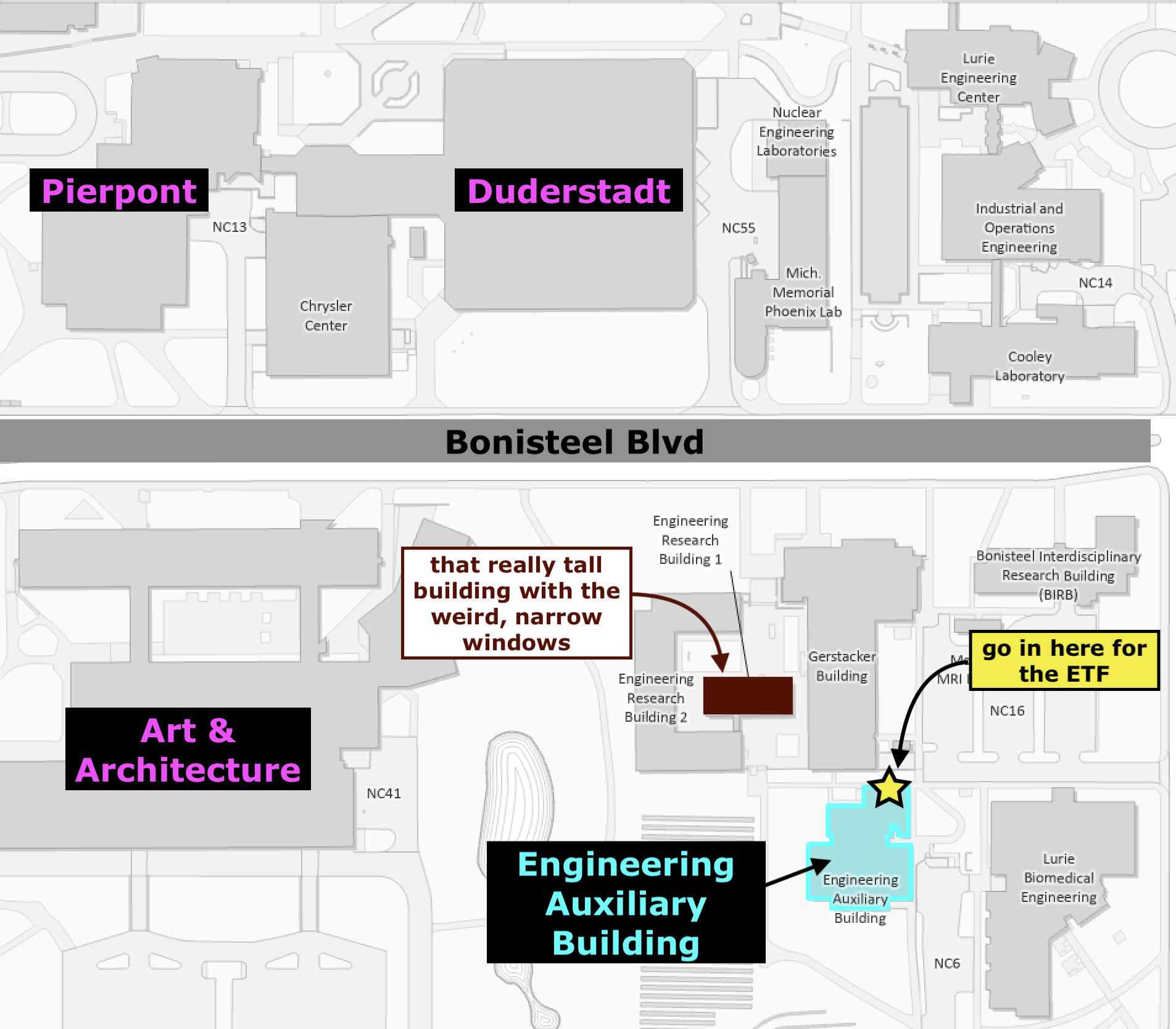
The ETF consists of a suite of rooms with computers for student to take online assessments. The computers are “locked down”, so that you will only be able to access the assessment you are there to take, including any instructor-provided reference sheets. Personal electronics, including but not limited to, phones, watches, eyeglasses, etc. are not allowed.
To take an assessment in an ETF, you will first make a reservation for a time that works with your schedule. When you arrive for your reservation, the ETF staff will check you in, show you where to store your backpack, jacket, etc. and tell you which computer station to go to. You will take the assessment, and when you finish, you will log out, grab your stuff, and continue on with your day!
Each student is expected to read and understand the ETF Policies and Procedures prior to taking a quiz or exam in the ETF.
What is PrairieTest?
Our ETF uses PrairieTest to handle the scheduling and logistics of assessments for ENGR 101. PrairieTest then links to the assessments on PrairieLearn, so you will be taking assessments using an online platform that you are familiar with.
How to Take an Assessment for ENGR 101
You will take your ENGR 101 assessments in the Engineering Testing Facility (ETF). The following sections describe how to reserve a time to take an assessment and what will happen when you show up to the ETF to take your assessment.
Signing Up For a Time To Take an Assessment
The assessment dates for the Fall 2026 semester are:
- Quiz 1
- Reservations open on September 7
- Quiz takes place September 21 — September 25
- Quiz 2
- Reservations open on September 28
- Quiz takes place October 12 — October 16
- Quiz retakes are available October 21 — October 23
- Quiz 3
- Reservations open on October 13
- Quiz takes place October 26 — October 30
- Quiz retakes are available November 2 — November 6
- Quiz 4
- Reservations open on October 26
- Quiz takes place November 9 — November 13
- Quiz retakes are available November 16 — November 20
- Final Exam
- Reservations open on September 22
- Final Exam takes place December 14 — December 18
- Final Exam retakes are not offered
Reservations for the ETF may be made anytime after the reservation period opens up until 30 minutes before any given session. Students tend to change their reservations around a lot, so if you don’t see a time you like right away, check back again later to see which sessions have availability.
We strongly recommend that you reserve a time to take the assessment in the first half of the assessment period. This way, if you forget about your quiz/exam or the bus runs late or you don’t feel well, you can cancel your original reservation and sign up for a new time later in the assessment period.
Remember that there are a lot of students in this course! The ETF cannot guarantee that there will be a spot for you if you wait until the last day of the assessment period to make a reservation.
Making a Reservation for the ETF
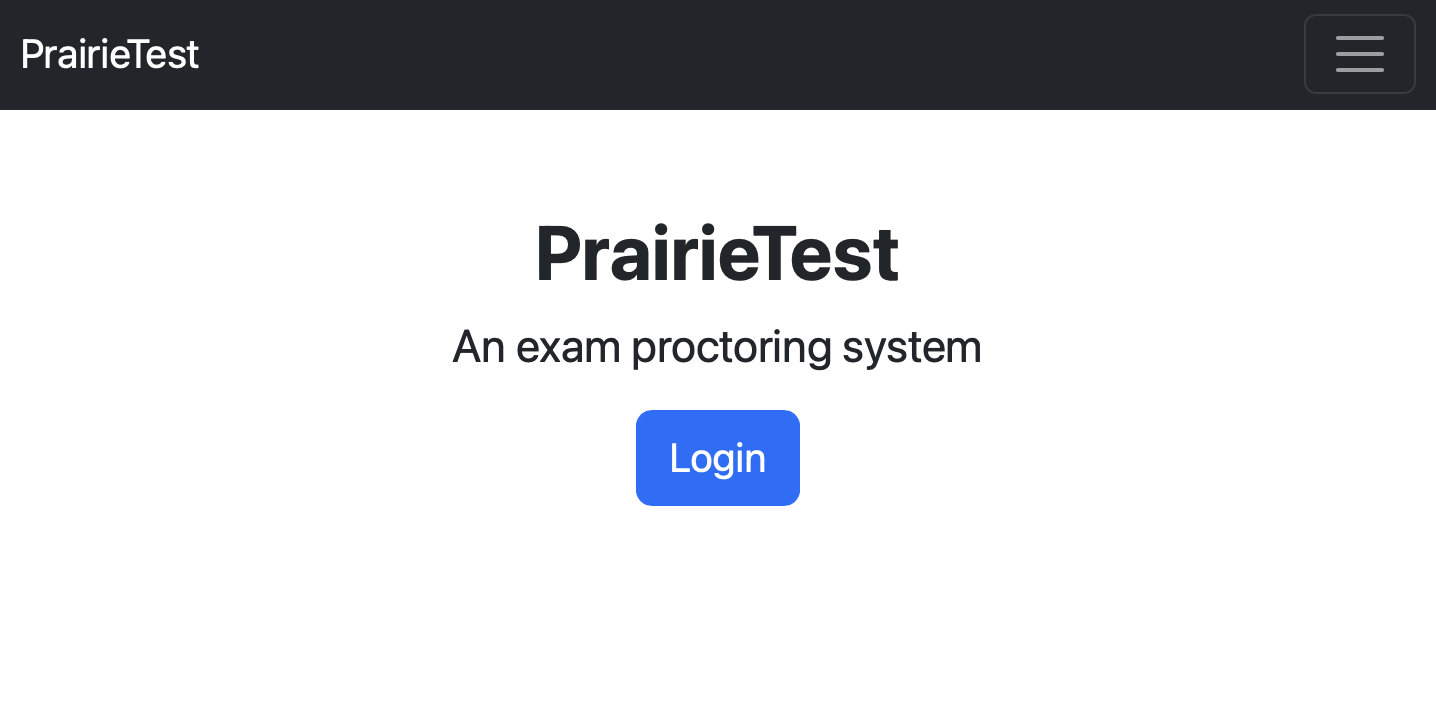
To make a reservation to take an assessment, go to PrairieTest:
When you go to PrairieTest, you should see a screen that asks you to login:
When you click Login you’ll be taken to a screen where you can scroll down and find University of Michigan:
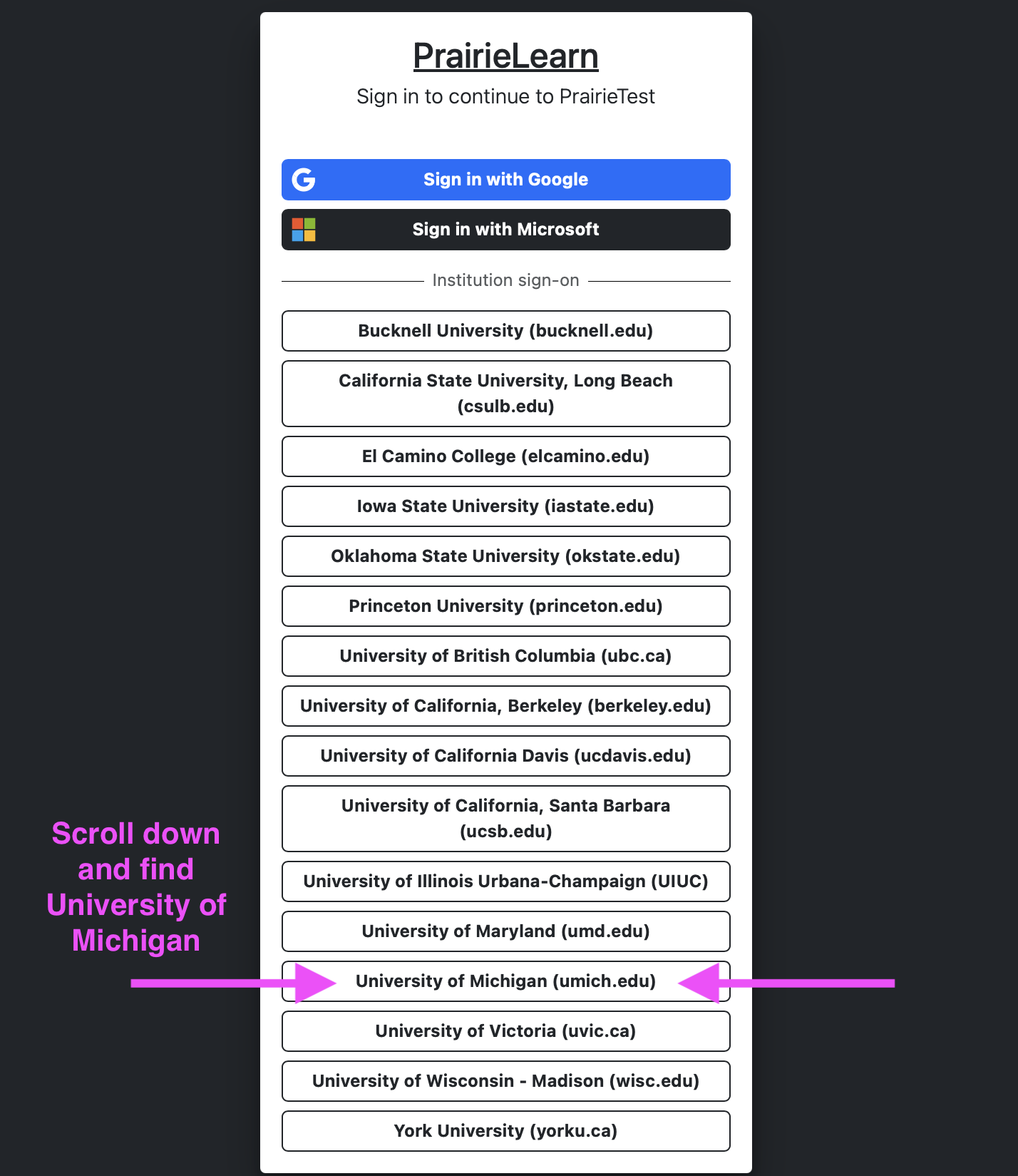
Note: If you’re already logged in with PrairieLearn, you might be automatically taken past this login screen. That is expected!
The first time you log in to PrairieTest, you’ll see the invitation to join our class:
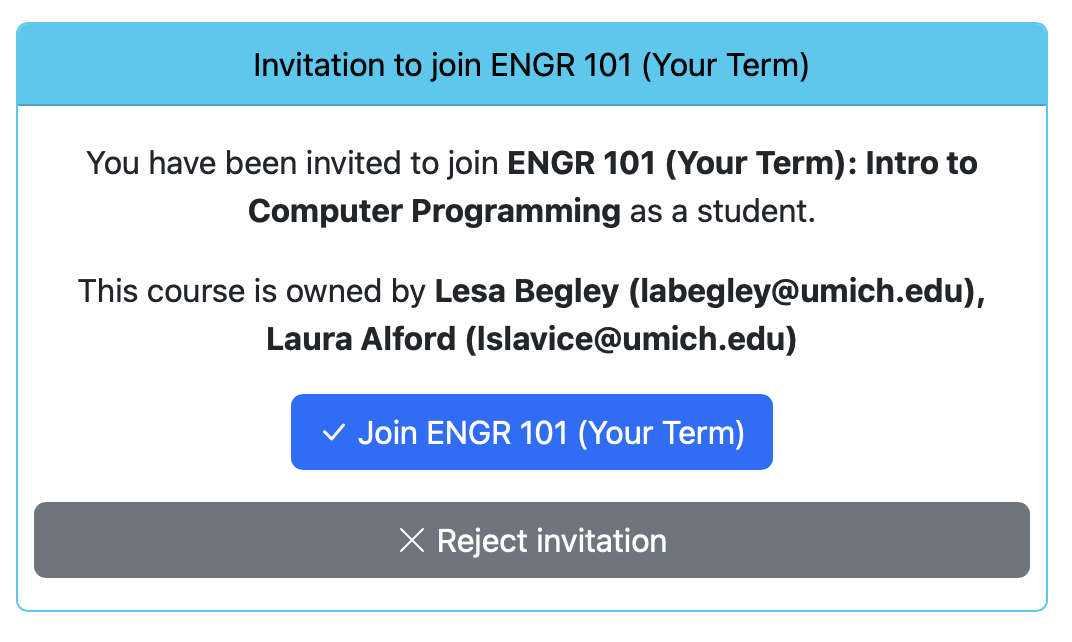
After you join ENGR 101 for this term, you will see what “exams” you are able to make a reservation for:

PrairieTest calls everything “exams”, whether it’s really an exam, quiz, assessment, lesson, whatever.
Click on Make a reservation and PrairieTest will show you which days/times have availability:
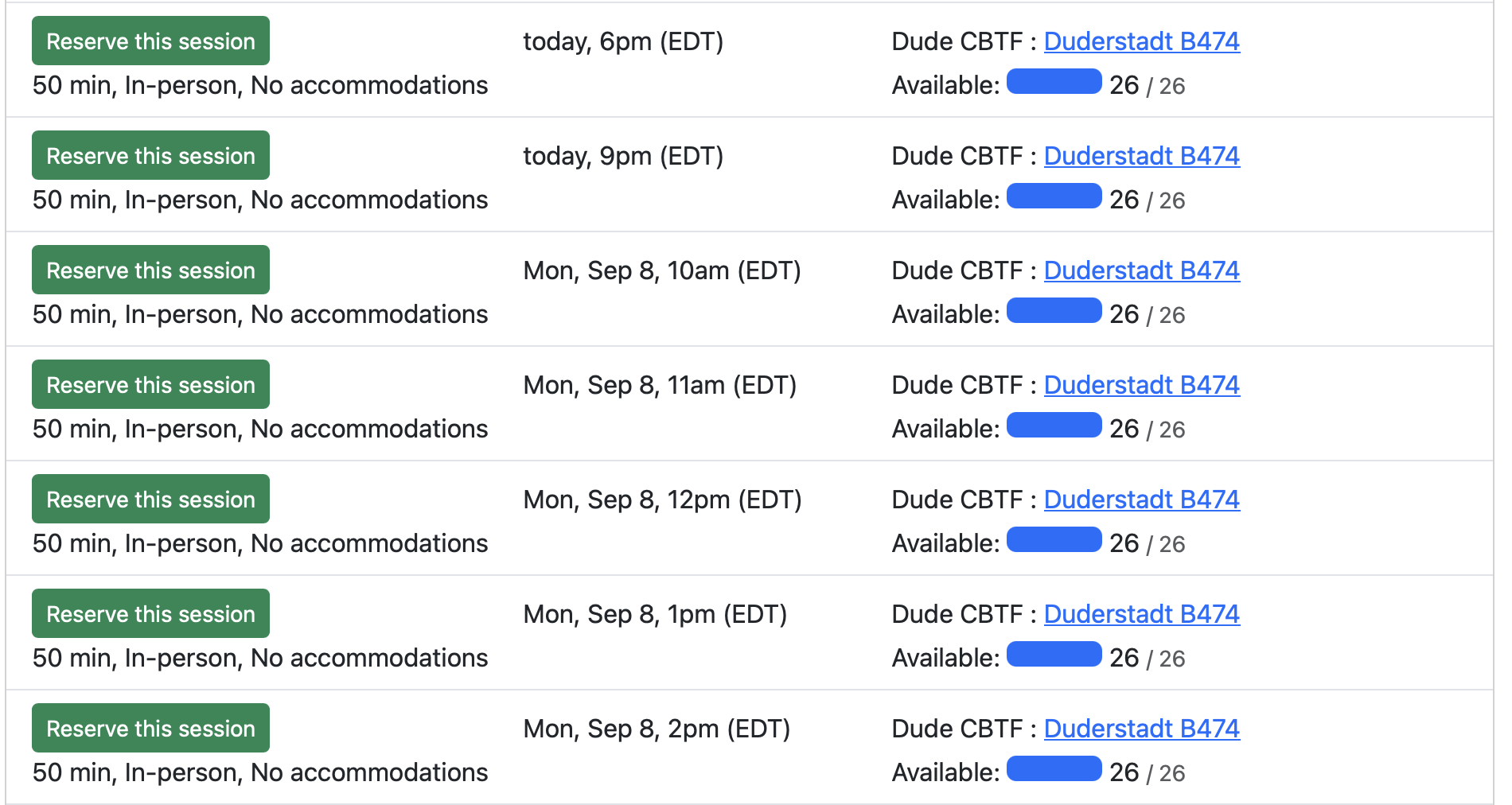
Find a day and time that works with your schedule (don’t forget to account for travel time!) and click Reserve this session to make your reservation. You will then see the details of your reservation:
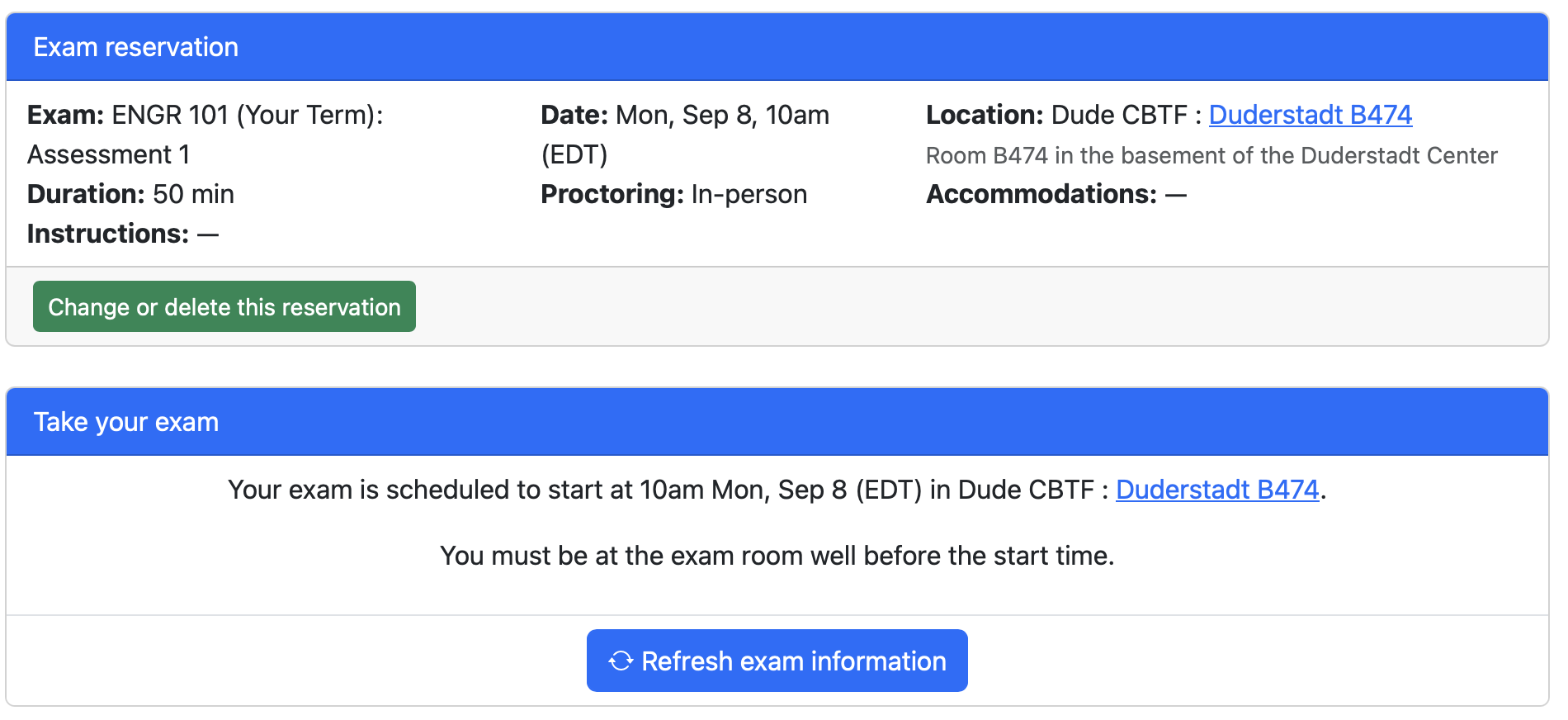
When you go back to the home page of PrairieTest, you will see your quiz reservation:

Make sure to add this time to your calendar!
Changing Your ETF Reservation
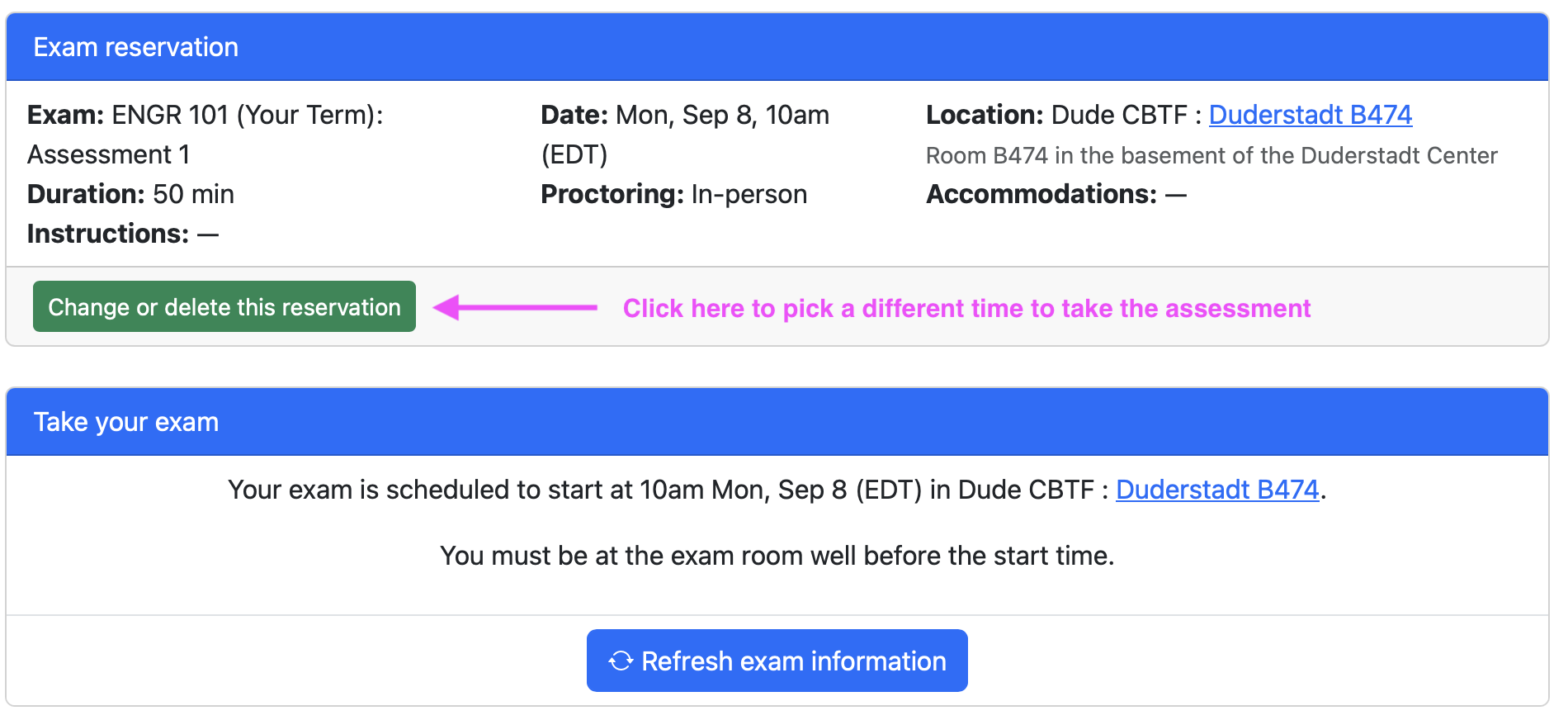
You may make changes to your reservation up until 30 minutes before the start of your exam session in PrairieTest. To change your reservation, click on the original reservation and then click Change or delete this reservation:
Taking an Assessment
This section will walk you through arriving at the ETF for your assessment and how to actually take the assessment.
Arriving at the ETF For Your Quiz
The ETF website has information on getting to the ETF.
Tips on planning your trip to the ETF:
-
At least one day before your first assessment, go to the ETF so that you know exactly how to get there. You don’t have to actually go in the ETF, but you don’t want to risk getting lost on your way to your first assessment!
-
Make sure you have your M-Card and a pen/pencil.
-
Go to the bathroom before you show up to the ETF.
-
Plan to arrive at the ETF about 15 minutes before the start of your reserved session. If you are late to your session, you will not be given extra time to finish your assessment.
Checking In For Your Assessment
The ETF facilitators will start checking in your session about 10-15 minutes before the start of your session. Here’s what will happen:
- Get out your M-Card and a pen/pencil.
- Put everything else from your pockets in your bag. Store all bags, coats, phones, watches, smart glasses, water bottles, and personal items in the designated cubbies. Keep your M-Card and your pen/pencil and nothing else.
- Join the line to get checked in.
- When it's your turn to get checked in, an ETF facilitator will ask for your M-Card and check you in on PrairieTest.
- The ETF facilitator will tell you which computer station you will be at (e.g. Station #23 on the Maize side, Station #75 on the Blue side) and return your M-Card.
- You may put away your M-Card.
- Take 1-2 sheets of scratch paper from the ETF check-in station if you want it.
- Follow the signs to go to your assigned station.
- Log in to the CAEN computer at your station.
- It takes 1-2 minutes for the computer to log you in and start everything up. Use this time to set out your paper and pen/pencil, adjust your chair, and get ready to start the assessment.
- When the computer is done getting everything ready for you, log in to PrairieTest using your U-M account.
- At the top of the page, you will see the assessment you are here to take:

- Click the assessment and you will be taken to your reservation, which you cannot change now that you are checked in:
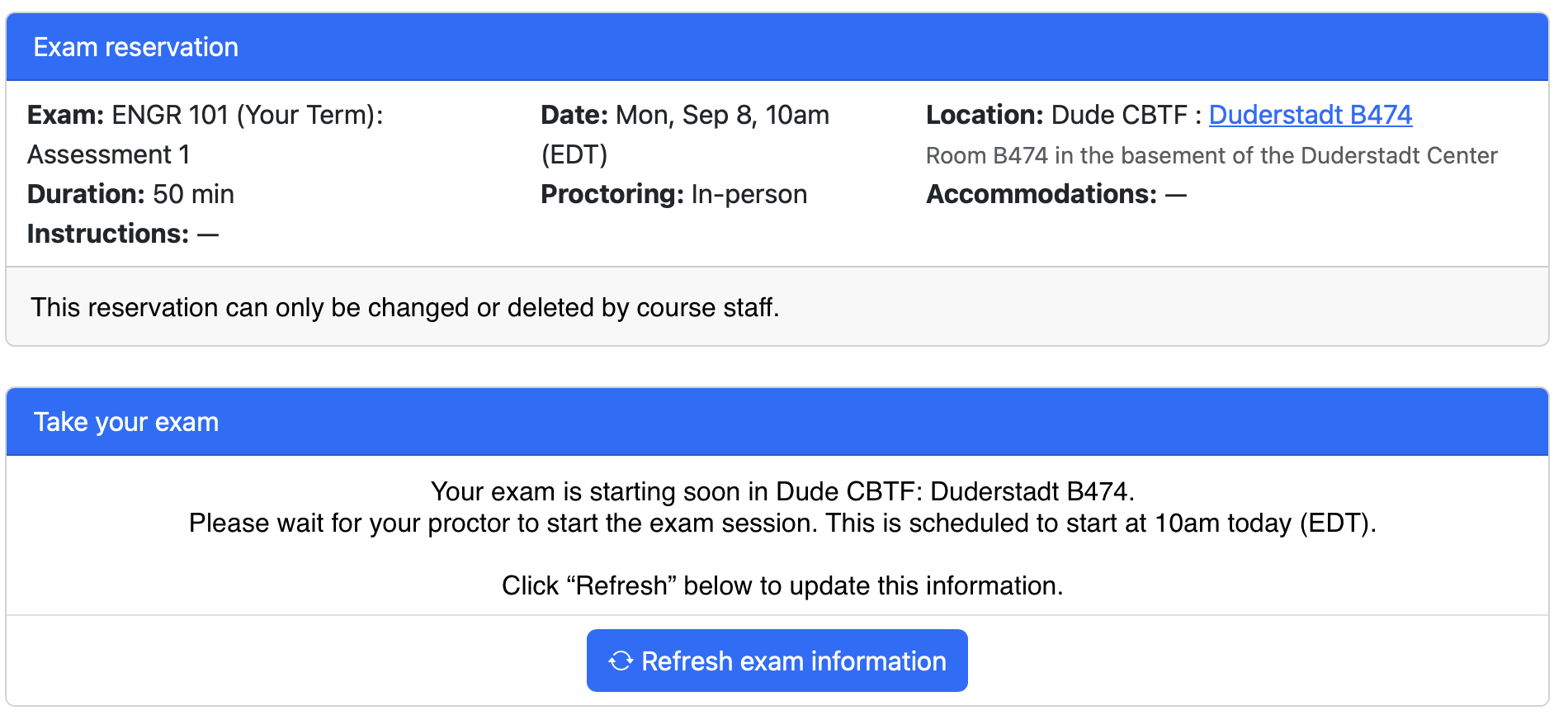
Starting the Assessment
- When all students are checked in and it is time for the session to start, the ETF facilitators will start the exam and you will see your screen change to this:
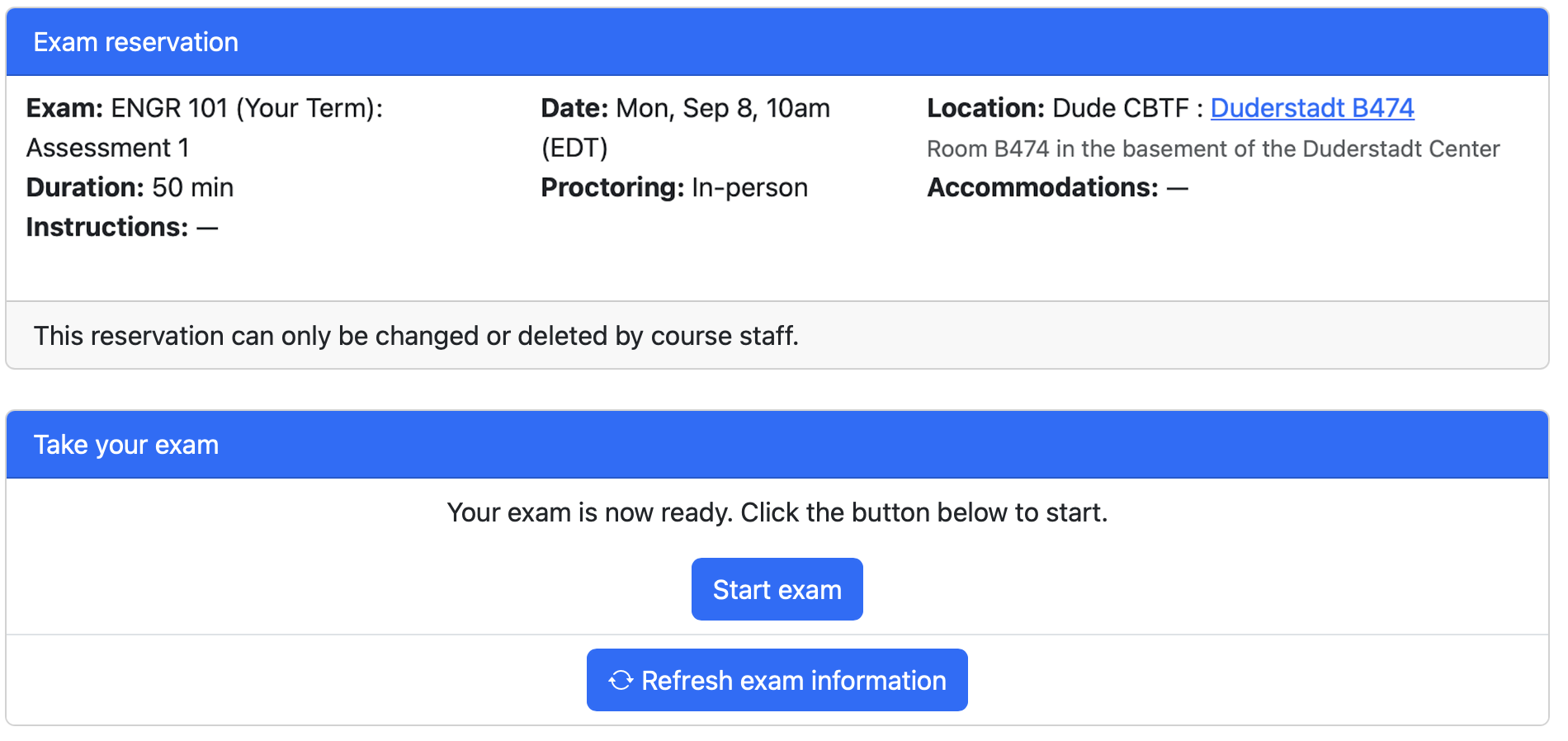
- Click Start exam to start your assessment.
- You will be taken to PrairieLearn and your quiz/exam.
- During the quiz/exam, you will only be able to access the quiz/exam on PrairieLearn. You will not be able to access any of your other assignments on PrairieLearn.
- Sign an abbreviated version of the CoE honor code at the beginning of the quiz.
Completing the Assessment
- Once you start the Assessment, you have 50 minutes to complete it. The PrairieLearn system will keep time for you. (If you have extended time accommodations through the SSD office, your allowed time will be adjusted accordingly.)
- PrairieLearn will give you a message at the bottom of the screen when your time is almost up. Close this message to finish saving your answers for that question.
- Complete the Assessment.
- You may answer the questions in any order.
- Remember to click Save & grade for each question.
- Check the Assessment Overview page to make sure you have answered and graded each question.
- When you are done, you can click “Finish Assessment” to close out your Assessment session. If you forget to do this, PrairieLearn will automatically close your Assessment when the timer runs out.
Ending Your ETF Session
After you have finished your assessment, you can leave the ETF. To end your session at the ETF:
- Log out of PrairieLearn.
- Log out of your computer.
- Put unused scratch paper back in the scratch paper bin. Put used scratch paper in the recycling bin by the check-in station. Scratch paper is not allowed to leave the ETF.
- Pick up all your personal stuff from the storage area.
- Double check that you have everything!
- Leave the ETF.
You do not have to wait for all students to finish their assessment, but please leave quietly so you cause the least amount of distraction possible for your fellow students.
Video Walkthrough of the Assessment Process at the ETF
It seems like a lot of steps when we write everything out! But we promise that it’s really not that complicated to take an assessment in the ETF. Watch the videos below to see how it all works!
Assessment Accommodations
If you have accommodations through the SSD office, those accommodations should be in place for you in the ETF. The most common accommodations we see are for extra time and a reduced distraction room. If you have one of these types of accommodations, they will show up in PrairieTest.
When you go to pick a time for your reservation, you will be able to confirm that your extra time and/or reduced distraction accommodation is in place:
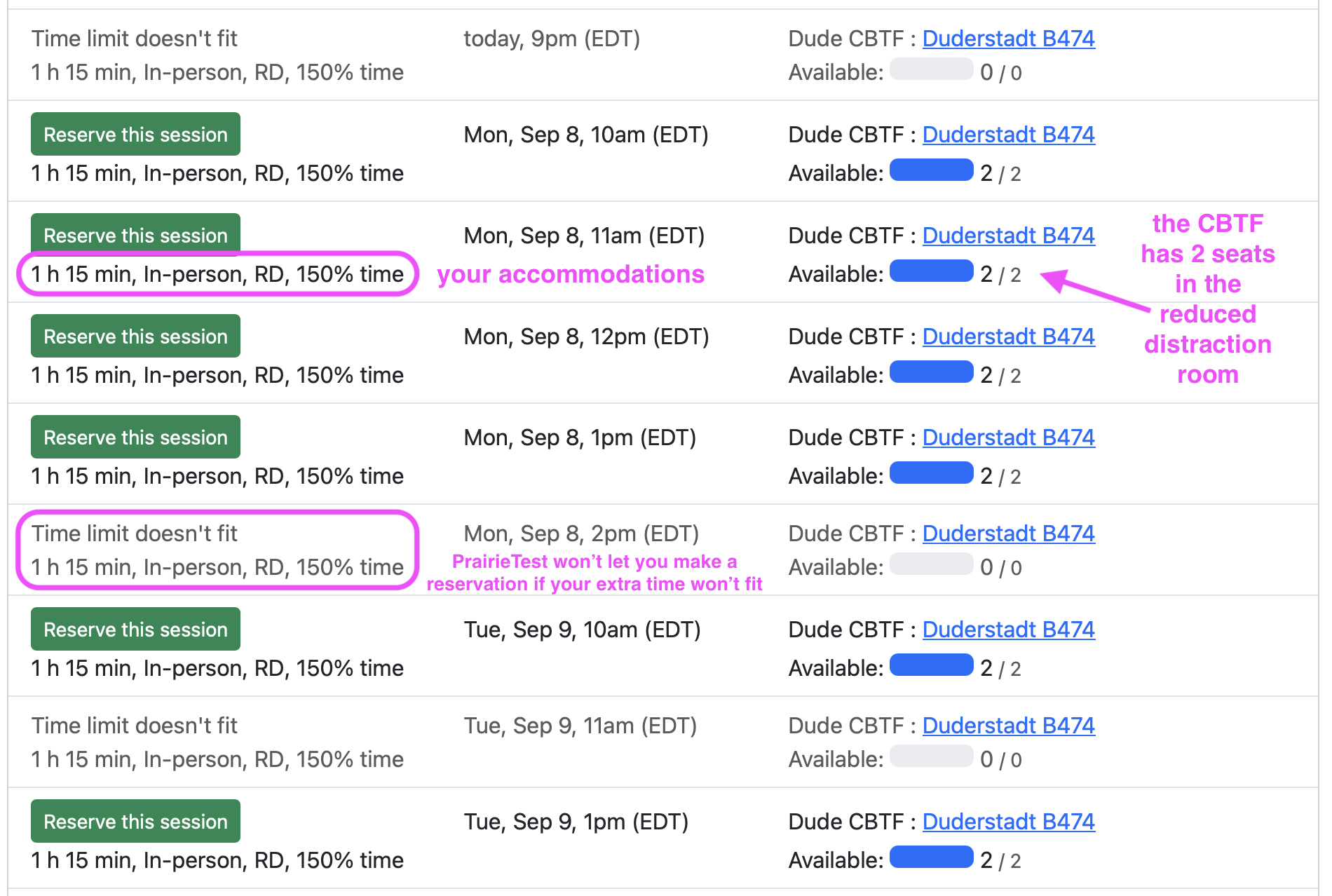
Note: The ETF has many more reduced distraction rooms than just two! This is just an example screenshot.
After you select your time, you can click your reservation and verify that the accommodations are in place:
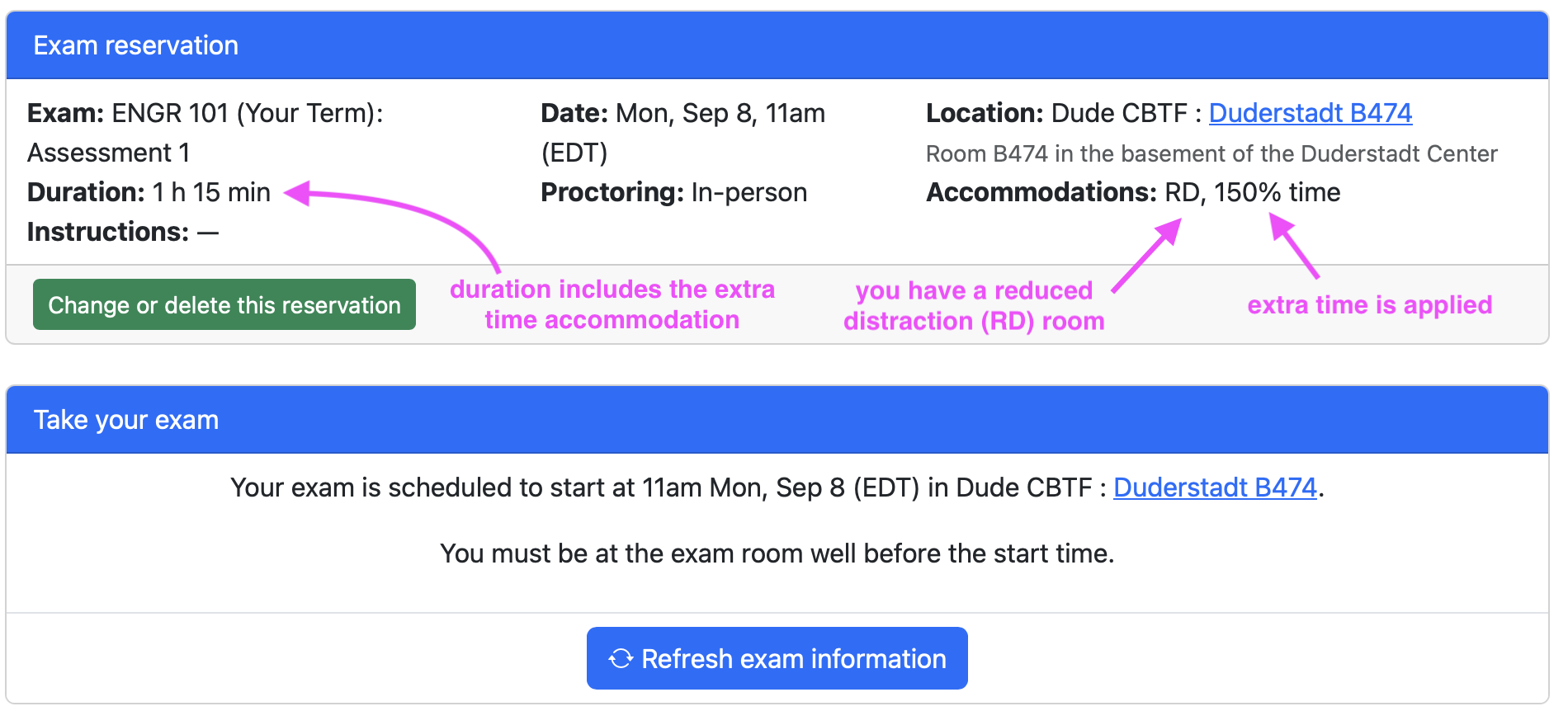
If you have an accommodation for taking a break during quizzes, you will be allowed to do so, but you will not be able to talk to anyone or access your personal items during the break. Please keep in mind that no extra time will be provided for breaks.
If you have an accommodation for food, drink, medications, etc., you will be able to place those items at the check-in station. Food and drink are not allowed at your computer station.
Heads Up!
If you make a reservation before your accommodations are in place at the ETF, the accommodations will not be applied to your existing reservation(s). So, check your reservations! If they say “No accommodations”:

then you should go to that reservation and then click “Change or delete this reservation”:
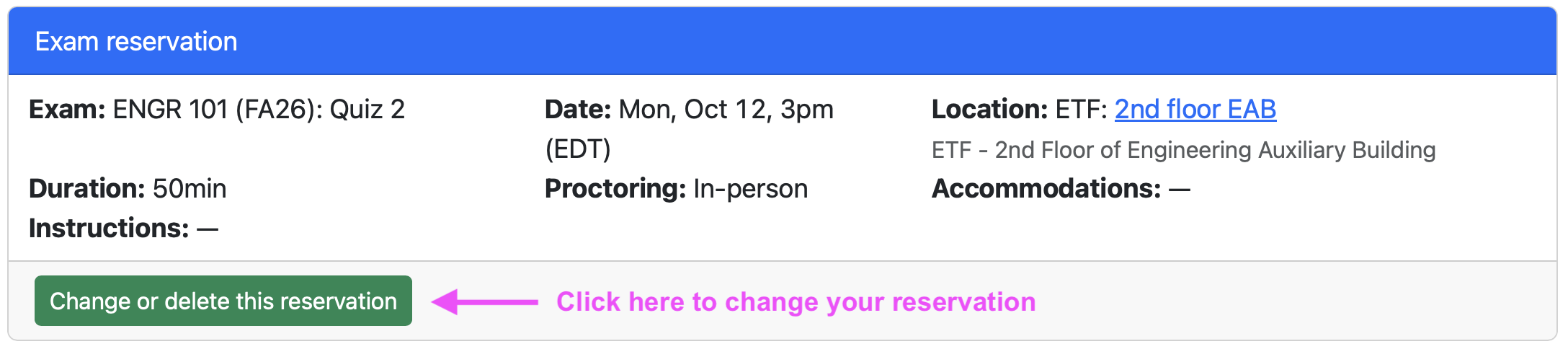
Your new date/time options will include your updated accommodations.
If you have any other concerns or questions about your accommodations, please see the section on Accommodations in the ETF on the main ETF website.
Allowed Resources & Cheating
You are not allowed to bring your own notes for the assessments, but there will be a comprehensive reference sheet available with the assessments. The same reference sheet is available with the practice assessments so you can see exactly what will be on it.
You will be given scratch paper so that you can draw/sketch out anything that helps you answer the questions on the assessments.
Collaboration with others in any form is prohibited and considered an honor code violation.
FAQs
Below are frequently asked questions about assessments in ENGR 101. If anything is unclear, please post on Piazza so we can clarify things for you. We want you to be as comfortable and confident as you can be for each assessment.
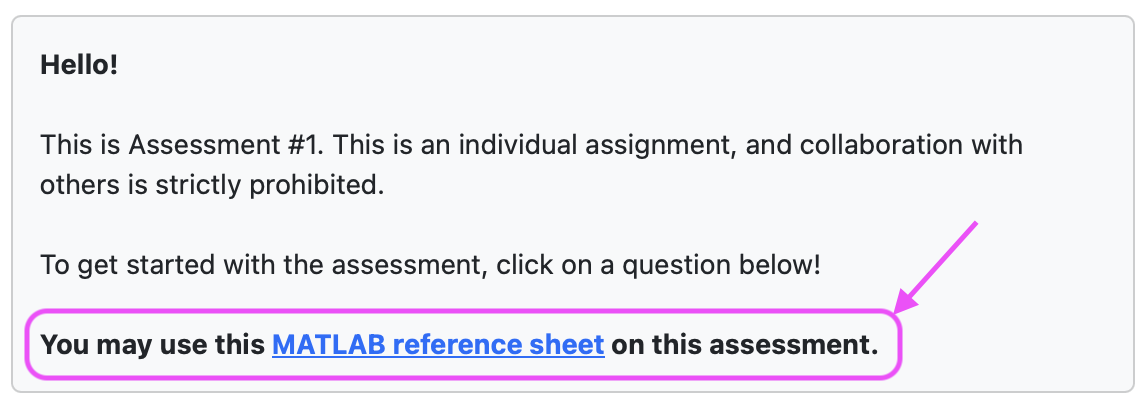
Is there a reference sheet for the Quiz?
Yes! The reference sheet is linked on the front page of the quiz, just like in the practice quiz:
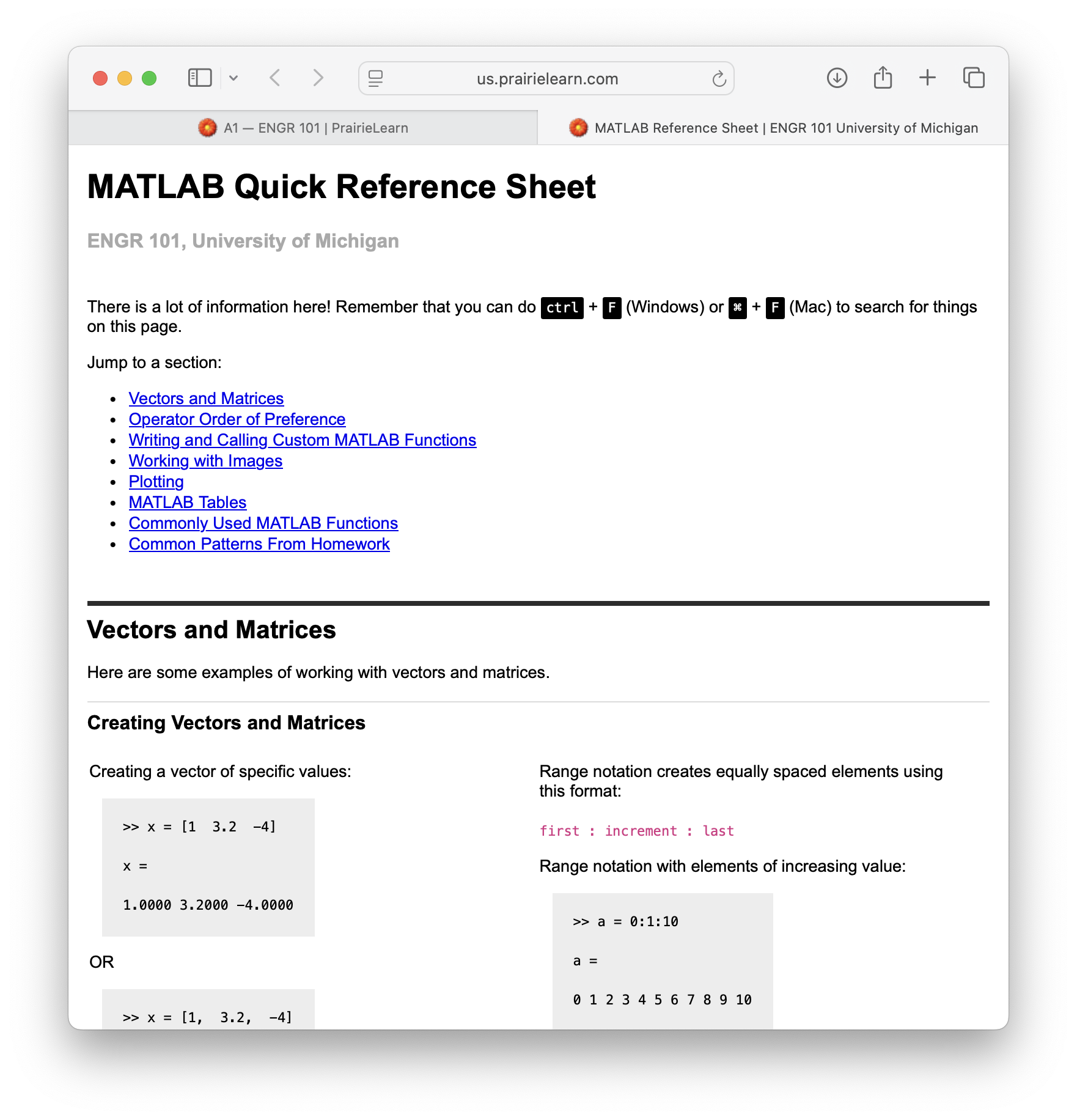
Click the link and it will open in a new tab:
What about for the Final Exam? Is there a reference sheet for that?
Yes! The MATLAB reference sheet and the C++ reference sheet are linked on the front page of the exam, just like in the practice exam.
Can I Use My Own Reference Sheet?
Personal reference sheets are not allowed on quizzes or exams in ENGR 101.
What happens if I miss my quiz or exam? Can I reschedule my time?
If you miss your ETF reservation for any reason, you can go to the ETF and ask for one of the ETF facilitators to delete your original reservation. You will need to provide your M-Card as proof of identity. After the ETF facilitator has deleted your original reservation, you will be able to reserve a new session just like you did the first time.
If you miss your original assessment time and there are no sessions available for you to reschedule your assessment, you can email the ENGR 101 Course Coordinator and they will help you make up the missed assessment for up to 50% (no re-take allowed). This can only be done once in the semester. See the syllabus for more details.
We strongly recommend you choose a time earlier rather than later to schedule your assessment, just in case something happens!
What if I’m taking a quiz and I don’t understand a question?
The ETF facilitators are not able to answer questions about what is on the quiz or exam. You may ask them for help with things like logging in to the computer, making sure you’ve clicked on the right thing to start the quiz, etc.
We have thoroughly tested all of the assessment questions, and we are confident that the questions are working the way they are supposed to. Please make sure you understand the practice quiz/exam questions prior to taking the actual quiz/exam, as this will help you to be well-prepared for the assessment.
If you believe that something is truly broken with the question, you can report an issue with the question by clicking that button in PrairieLearn. Please note that “I don’t like my grade on this question” is not an indicator of something broken with the question.